How to Clean a Vanity Mirror Screen Safely?

Time:2026-10-13 Author:Oliver
0%

A vanity mirror screen looks like ordinary glass, but its hidden display, touch layer, and edge seals need gentler care. That difference changes what is the best way to clean a vanity mirror screen. Grand View Research’s 2024 Smart Mirror Market Report describes growing adoption across homes, hotels, and beauty spaces. More installations mean more people must protect electronics while removing fingerprints, powder dust, and hairspray film. The risk is real. A wet cloth can push liquid behind the bezel, where drying may be slow and damage difficult to see.

Cleaning specialist Carolyn Forté, director of Good Housekeeping’s Home Care and Cleaning Lab, advises, “Never spray cleaner directly on the mirror.” That practical rule supports manufacturer care guidance for electronic displays: power down first, use a soft microfiber cloth, and keep moisture controlled. The U.S. Environmental Protection Agency’s Safer Choice program also stresses following product labels and choosing suitable formulations. Still, a report is not a substitute for your model’s manual. Coatings vary. Some screens have anti-glare or fingerprint-resistant layers, while others may react badly to alcohol, ammonia, or abrasive powders.

This guide examines a careful, repeatable method, from removing loose grit to wiping in straight, light passes. It also addresses a common mistake: polishing harder when streaks remain. That instinct feels efficient, but it can spread residue and create micro-scratches. The goal is not showroom perfection after one swipe. It is controlled cleaning, minimal liquid, and a screen that stays clear, responsive, and safely sealed.
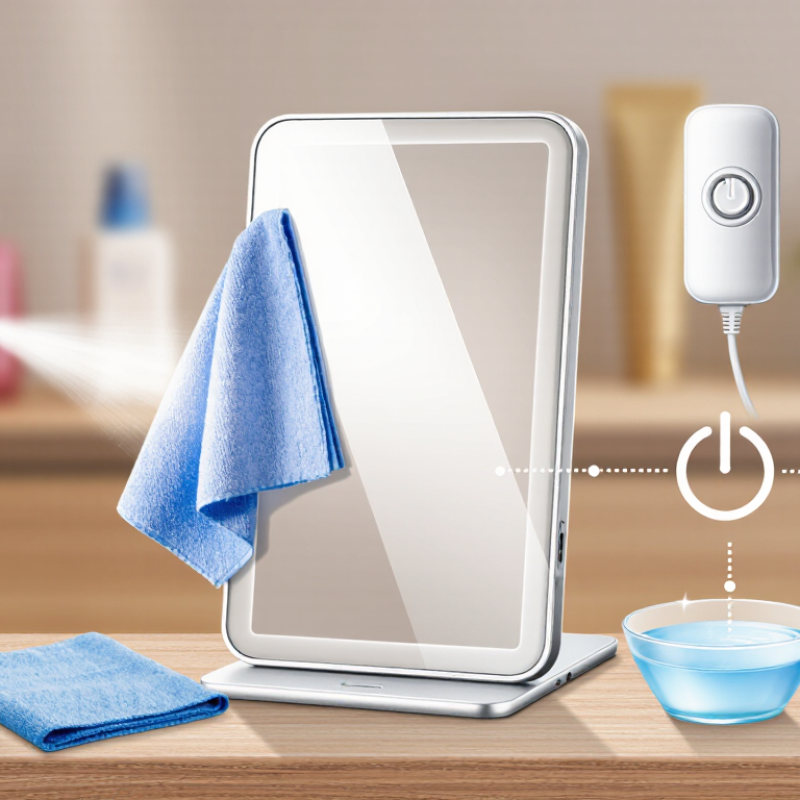
How to Clean a Vanity Mirror Screen Safely?

Understanding Vanity Mirror Screen Materials and Safety Risks

How to Clean a Vanity Mirror Screen Safely?

Understanding Vanity Mirror Screen Materials and Safety Risks

A vanity mirror screen is not always ordinary glass. Its surface may include tempered glass, acrylic, an anti-glare coating, or a touch-sensitive layer. Some models also contain LED lighting and sealed electrical parts behind the panel. These materials react differently to pressure, heat, and cleaning chemicals. Acrylic can scratch easily. Coatings may become cloudy after repeated exposure to alcohol or ammonia. Even glass can suffer damage around its edges.

Unplug the mirror before cleaning. Let the surface cool completely. A soft, clean microfiber cloth is safer than paper towels, which may leave fibers or tiny scratches. Lightly dampen the cloth with distilled water and a small amount of mild, neutral soap. Never spray liquid directly onto the screen. Moisture can enter buttons, seams, or charging ports. Wipe gently in straight movements, then dry the surface with another cloth. Keep your hands dry.

In my experience, using too much pressure feels efficient but often makes cleaning riskier. Fingerprints may need a second pass. That is normal. Avoid abrasive powders, rough sponges, window scrapers, and strong solvents. Test any cleaning solution on a hidden corner first, although this step is easy to forget. If the screen shows flickering, trapped moisture, cracks, or unusual heat, stop using it and seek qualified electrical assistance. Do not reopen the housing yourself. Safety matters more than a perfectly spotless reflection.

Preparing the Screen, Cleaning Tools, and Suitable Solutions

A vanity mirror screen needs preparation before cleaning. Turn it off and unplug it if possible. Let the screen cool completely. Bright light can hide thin makeup dust and dried water spots. Check the care instructions for the screen’s coating. Some surfaces react poorly to alcohol, ammonia, or abrasive cleaners. I once wiped too quickly and dragged powder across the glass. That habit caused fine marks.

Use two clean, lint-free microfiber cloths. Keep one dry for dusting and one slightly damp for cleaning. Distilled water is a safe starting solution because it leaves fewer mineral spots. For oily fingerprints, mix a tiny amount of mild, pH-neutral soap with distilled water. The mixture should feel almost like plain water. Never soak the cloth. Never spray liquid directly onto the screen.

Wipe gently from top to bottom, using straight strokes. A soft cotton swab can reach the narrow frame edges, but keep moisture away from ports, buttons, and seams. Turn the cloth often so trapped grit does not scratch the surface. Dry the screen with the second microfiber cloth. Do not press hard on touch-sensitive areas. Stubborn spots may need a second pass, not stronger chemicals. I still inspect the corners afterward, because they often hold residue. If streaks remain, the cloth may be carrying fabric softener or dust. Wash it separately and skip scented laundry products.

Removing Dust and Surface Debris Without Causing Scratches

How to Clean a Vanity Mirror Screen Safely?

Dust can scratch a vanity mirror screen when hard particles move across its surface. ISO 14644-1 classifies airborne particles from 0.1 to 5 micrometres. Some are nearly invisible but still abrasive. I once wiped a dusty screen immediately. That was a mistake. Experience taught me to remove loose debris before touching the glass.

Turn off the screen and let it cool. Use a clean air blower from several centimetres away. Do not use compressed air, which can force dust into edges and buttons. Inspect the surface under a side light. Fold a fresh, lint-free microfiber cloth into quarters. Slightly dampen one section with distilled water. Never spray liquid directly onto the screen. The 2023 ASTM D1003 haze standard shows why surface clarity matters; small residues can affect visible light transmission.

Wipe in straight, overlapping passes with almost no pressure. Circular rubbing can move grit repeatedly across one area. Change to a clean cloth section after each pass. For fingerprints, add only a small amount of screen-safe cleaner to the cloth. Avoid paper towels, rough cotton, alcohol-heavy formulas, and household glass sprays. Check the frame and lower edge carefully. Moisture can collect there. My earlier habit was using one cloth for every surface. I would not repeat it. A cloth that cleaned a countertop may carry mineral grit. Let the screen air-dry completely before switching it on again.

How to Clean a Vanity Mirror Screen Safely?

Removing dust and surface debris before wiping helps reduce scratch risk. The chart shows representative particle diameters that may be present on a mirror screen. Larger particles, such as fine sand, can act as abrasive debris when dragged across the surface.

Use air or a clean, soft brush to remove loose particles first. Then use a clean microfiber cloth lightly dampened with water or a screen-safe cleaner, applying minimal pressure and avoiding circular scrubbing.

Cleaning the Vanity Mirror Screen with Gentle, Controlled Motions

How to Clean a Vanity Mirror Screen Safely?

A vanity mirror screen needs a careful touch, not aggressive polishing. The U.S. Environmental Protection Agency estimates that people spend about 90% of their time indoors. It also reports that indoor pollutant levels can be two to five times higher than outdoor levels. Dust deserves attention.

Turn the screen off and unplug the mirror before cleaning. Let the surface cool completely. Never spray liquid directly onto the display, edges, buttons, or seams. Dampen a clean microfiber cloth with distilled water. It should feel barely moist, never wet. Fold the cloth into a flat pad. Use slow, controlled horizontal strokes. Then make one gentle vertical pass. Avoid circles and hard pressure, which can move grit across the coating.

For fingerprints, add one drop of mild detergent to the water. Test the mixture on a hidden edge first. Wipe the mark lightly, then remove residue with a second damp cloth. Finish with a dry microfiber cloth. Inspect the screen under side lighting. I once rushed this step and left a cloudy streak, so patience matters. If dust remains, pause and lift it with the cloth instead of rubbing harder. CDC cleaning guidance also separates cleaning from disinfection; routine screen care usually needs removal of soil, not harsh disinfectants. Surface coatings vary, and I would check the device’s care instructions before using any chemical.

How to Clean a Vanity Mirror Screen Safely? - Cleaning the Vanity Mirror Screen with Gentle, Controlled Motions

Cleaning Stage Recommended Action Materials or Conditions Control Point Typical Time
1. Power Down Turn off the vanity mirror and disconnect it from the power source before cleaning. Dry hands; unplugged device Never clean an energized screen or illuminated control panel. 1 minute
2. Remove Loose Dust Use a clean, dry microfiber cloth to lift dust with light, straight passes. Soft, lint-free microfiber cloth Do not use paper towels, tissues, or abrasive wipes. 1–2 minutes
3. Prepare the Cleaning Solution Moisten the cloth slightly with distilled water. For oily marks, use a very small amount of mild, pH-neutral soap diluted in water. Distilled water; mild soap; small spray bottle The cloth should be damp, never wet or dripping. 1 minute
4. Test a Small Area Test the damp cloth on a discreet corner or edge before cleaning the visible screen. Prepared microfiber cloth Stop if discoloration, haze, or surface damage appears. 30 seconds
5. Clean with Controlled Motions Wipe gently in overlapping horizontal or vertical strokes, working from the cleanest area toward dirtier sections. Light hand pressure; damp microfiber cloth Do not scrub, press hard, or make rapid circular motions. 2–4 minutes
6. Clean the Edges and Controls Use a barely dampened corner of the cloth around bezels, buttons, seams, and sensor areas. Cloth corner; cotton swab for narrow gaps Prevent liquid from entering openings, ports, speakers, or control gaps. 1–2 minutes
7. Dry and Polish Lightly Buff the surface gently with a second clean, dry microfiber cloth. Dry microfiber cloth Use light overlapping strokes until no visible moisture remains. 1–2 minutes
8. Final Inspection Check the screen under indirect light for streaks, residue, or remaining fingerprints. Soft ambient lighting Repeat only on a visible spot instead of repeatedly wiping the entire surface. 1 minute
Important Safety Notes: Do not spray liquid directly onto the mirror screen. Avoid abrasive cleaners, ammonia-based products, bleach, acetone, solvents, and rough materials. Always check the device care instructions before using any cleaning solution.

Drying, Inspecting, and Maintaining the Screen Safely

How to Clean a Vanity Mirror Screen Safely?

Turn off the vanity mirror and unplug it before touching the screen. Let it cool completely. A warm display can spread moisture unevenly and show streaks more clearly. In my experience, a clean, dry microfiber cloth removes loose dust without scratching the surface. If marks remain, dampen one corner with distilled water. The cloth should feel barely moist, never wet. Do not spray liquid directly onto the screen, frame, buttons, or edge seals.

Drying deserves patience. Wipe gently in straight lines, then use a second dry microfiber cloth. Pay close attention to the lower edge, where moisture can collect unnoticed. Hold the mirror under soft side lighting and inspect it from different angles. Look for cloudy patches, trapped droplets, loose trim, or new scratches. Stop if the surface feels rough. I once wiped too quickly and mistook a remaining streak for a scratch.

Maintain the screen with light, regular cleaning rather than forceful scrubbing. Keep cosmetics, hairspray, and oily skincare products away from the display. If residue appears, repeat the barely damp wipe instead of using stronger chemicals. Avoid abrasive pads, paper towels, alcohol-heavy solutions, and household glass cleaners unless the manufacturer specifically permits them. Store the cloth in a clean drawer. A forgotten grain of dust can create a fine mark during the next cleaning. Check the power cord and controls occasionally, especially after any moisture spill.

FAQS

Why should dust be removed before wiping the vanity mirror screen?

Tiny hard particles can scratch the surface during wiping. Some dust is almost invisible. Lift loose debris first.

What should I do before cleaning the screen?

Turn off and unplug the mirror. Let the screen cool completely. This reduces electrical and moisture risks.

What is the safest way to remove loose dust?

Use a clean air blower from several centimetres away. Do not use compressed air. It may push dust into seams and buttons.

Which cloth is suitable for cleaning the screen?

Use a fresh, lint-free microfiber cloth. Fold it into quarters. A cloth used on a countertop may carry gritty residue.

How much water should I use?

Dampen the cloth with distilled water. It should feel barely moist, never wet. Never spray liquid directly onto the screen.

Which wiping motion helps prevent scratches?

Use slow, straight, overlapping passes. Apply almost no pressure. Avoid circular rubbing, which may move grit repeatedly across one area.

How can I remove fingerprints or cloudy marks?

Add one small drop of mild detergent to the damp cloth. Test a hidden edge first. Wipe gently, then remove residue with another damp cloth.

What cleaning products should I avoid?

Avoid paper towels, rough cotton, strong alcohol formulas, and household glass sprays. Surface coatings differ. Check the care instructions before using chemicals.

How should I finish the cleaning process?

Use a dry microfiber cloth and inspect the screen under side lighting. Check the lower edge and frame. Let everything air-dry completely before switching on the mirror.

What mistake should I avoid repeating?

Do not rush or polish aggressively. I once left a cloudy streak by skipping inspection. Sometimes, waiting is better than wiping harder.

Conclusion

Cleaning a vanity mirror screen safely begins with understanding its surface, which may combine reflective glass, a protective coating, and electronic components. Before starting, turn off and unplug the mirror if applicable, then check the manufacturer’s care guidance. Prepare a soft microfiber cloth, a clean dry towel, and a mild screen-safe cleaning solution. Avoid abrasive powders, rough paper towels, strong solvents, and spraying liquid directly onto the screen.

First, gently remove dust and loose debris with a dry microfiber cloth, using light strokes to prevent scratches. Apply a small amount of solution to the cloth rather than the screen, and clean with slow, controlled motions from one section to another. Do not press hard or allow moisture to enter edges, buttons, lights, or ventilation openings. The best answer to “what is the best way to clean a vanity mirror screen” is to use minimal moisture, gentle pressure, and suitable materials. Finish by drying the surface with a fresh cloth, inspecting it under good lighting, and cleaning it regularly to prevent buildup.

Oliver

Oliver

Oliver is a seasoned marketing professional with a wealth of expertise in driving brand awareness and engagement. With a deep understanding of our company's product offerings, he consistently delivers high-quality content that enriches our professional blog. His insights not only shed light on......